
























Support answer
How do I register my Dolphin's warranty?
Short answer: Register your Dolphin through Maytronics' online portal using your robot's serial number and proof of purchase.
Based on Maytronics support, updated 2025-11-24, rewritten by Poolbots' pool experts. Applies to 61 models.
The answer
What to know.
Use the Maytronics registration portal at warranty details to register your Dolphin and submit a rebate request.
Have your robot's serial number and proof of purchase ready before you start.
Find your serial number
Your Dolphin's serial number has 10 characters. You can find it in any of these locations:
- The white label on the outside of the box.
- Your warranty card.
- The white barcode label on the Dolphin's inside casing.
Register your Dolphin
-
Step 1Open the registration portal
Visit warranty details.
-
Step 2Enter the serial number
Type your robot's serial number in the first field. For help finding it, select the “i” icon beside “Where do I find my robot’s serial number?”.
-
Step 3Choose your previous cleaning method
Select how you cleaned your pool before getting your Dolphin. Then select “Continue.”
-
Step 4Add your personal information
Fill in your details. When you start typing your country or state, choose the correct entry from the dropdown list. Select “Continue” when you are done.
-
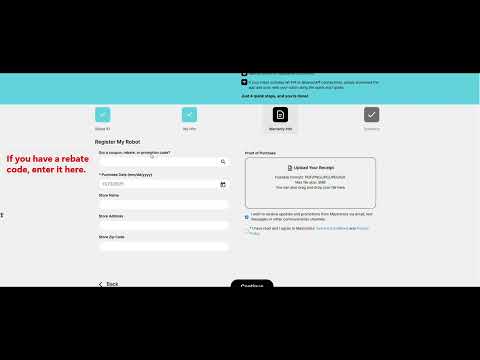
Step 5Add promotion and purchase details
Enter your rebate or promotion code in the first field, if you have one. Otherwise, leave that field empty. Select your purchase date. You can also provide the store name, address, and ZIP code.
-
Step 6Upload your proof of purchase
Select “Upload Your Receipt.” An original receipt or original invoice is preferred. It must include the purchase date, product, and price.
If you cannot find the original receipt, you can use a credit card or bank statement instead. Leave only the date, merchant/product, and amount visible. Hide or remove personal information before uploading it.
-
Step 7Accept the terms
Agree to the Terms & Conditions, then select “Continue.”
-
Step 8Review and submit
Check the information you entered, then select “Submit” to finish registering your Dolphin.
Check your warranty length
Warranty length depends on your model and region. Check your model's product page for its warranty length. Poolbots' pool experts can help by live chat or phone if you need clarification.
Watch the registration walkthrough
This video covers robot registration and rebate request submission.
Start a warranty repair claim
For a Dolphin repair or power supply replacement, use Maytronics' self-service tool to submit a warranty claim, also called an RMA (Return Merchandise Authorization).
If you need help, contact Poolbots' pool experts by live chat or phone. For warranty repairs, Poolbots will point you to Maytronics' service process.
Applicable models
- Dolphin Wave 120
- Dolphin Wave 100
- Dolphin Sigma
- Dolphin M400
- Dolphin Wave 60
- Dolphin Oasis Z5i
- Dolphin Wave 80
- Dolphin Nautilus CC Supreme
- Dolphin Explorer E40
- Dolphin ADVANTAGE
- Dolphin Nautilus CC
- Dolphin Proteus DX3
- Dolphin Echo
- Dolphin S100
- Dolphin Nautilus AG
- Dolphin Premium 10
- Dolphin T15
- Dolphin Cayman
- Dolphin Premium 20
- Dolphin T25
- Dolphin Active 10
- Dolphin S50
- Dolphin Active Solo
- Dolphin Active 15
- Dolphin Escape
- Dolphin ADVANTAGE ULTRA
- Dolphin S200
- Dolphin Quantum
- Dolphin Active 20
- Dolphin ADVANTAGE PRO
- Dolphin Proteus DX4
- Dolphin Nautilus CC Pro
- Dolphin Proteus DX5i
- Dolphin S300
- Dolphin Active 30
- Dolphin Premium 30
- Dolphin T35
- Dolphin Premium 40
- Dolphin T45
- Dolphin Explorer E30 WiFi
- Dolphin T55i
- Dolphin S400
- Dolphin Active 40
- Dolphin Explorer E50
- Dolphin Premier
- Dolphin Nautilus CC Plus
- Dolphin Explorer E25
- Dolphin Nautilus CC Plus WiFi
- Dolphin Nautilus Titan
- Dolphin M550
- Dolphin Premium 60
- Dolphin M600
- Dolphin T60
- Dolphin Explorer E70
- Dolphin W20
- Dolphin Wave 300 XL
- Dolphin Wave 140
- Dolphin Wave 200 XL
- Dolphin Liberty 200
- Dolphin Liberty 300
- Dolphin Liberty 400
Source: Maytronics support. Same steps and facts, rewritten for clarity; the videos and illustrations are Maytronics' own.
By model
This answer on your robot.
Maytronics tags this answer for the 61 models below.
Still need help?

