
























Wave Commercial · Model 99997201-US
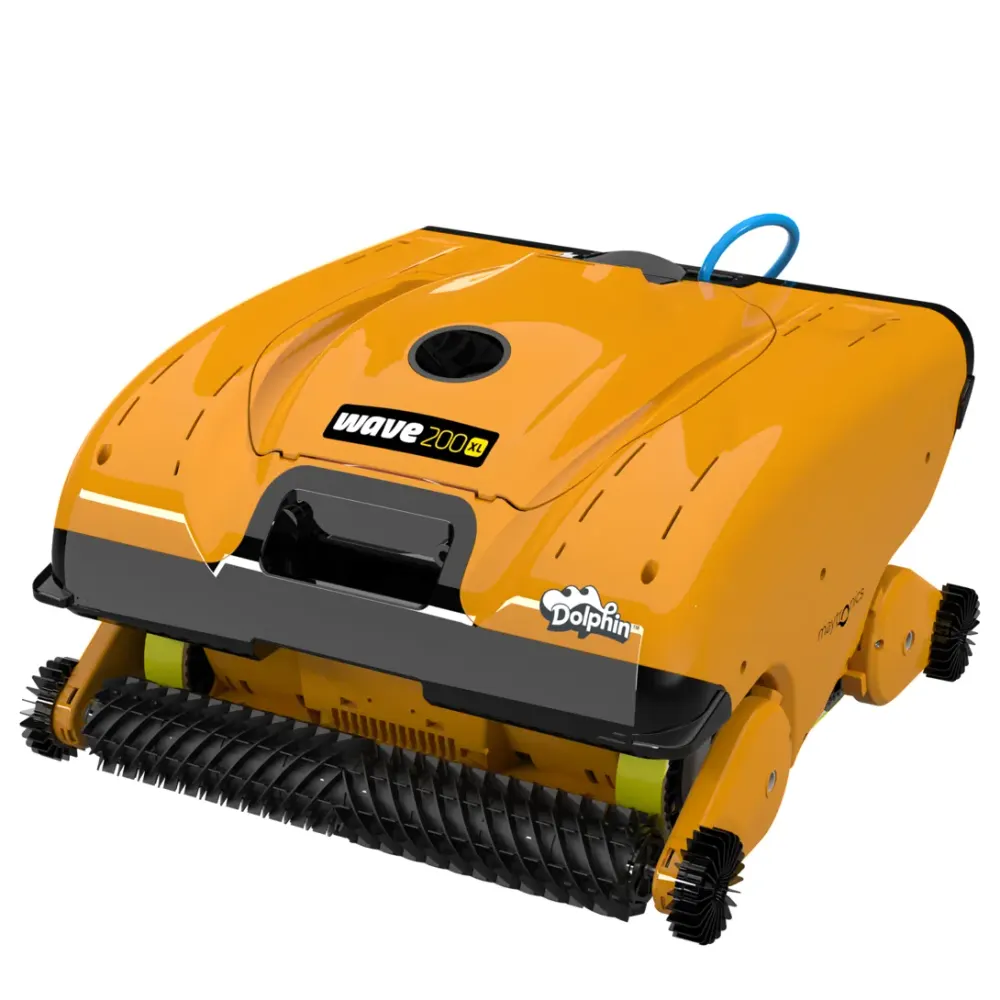
Dolphin Wave 200 XL manual and guides.
The official Wave 200 XL documents, hosted here, the how-to videos and the spec sheet, with the parts, warranty and troubleshooting pages one click away.
Documents
Wave 200 XL downloads.
PDFs are hosted here and open in a new tab. Missing one or need another language? and we will send it.
How-to videos
Setup and maintenance, shown step by step.

Tech specs
Dolphin Wave 200 XL specifications.
- Pool size
- Up to 127 ft
- Cleans
- Floor
- Cycle
- 6 Hours
- Warranty
- 3 years
- Filter
- Multi-Layer
- Cable
- 140 ft
- Weight
- 57.3 lb
Connectivity & Automation
- Weekly Timer
- No
- Automation Mode
- No
- Delay Feature
- Yes
Size & Dimension
- Package Dimensions
- 47.1x39.0x23.7 inch
- Cable Length
- 140 ft
- Robot Weight
- 57.33 lb
Cleaning
- Filter Type
- Multi-Layer
- Filter Access
- Top Access
- Cleaning Coverage
- Floor
- Full Filter Indicator
- Yes
- Waterline Scrubbing
- No
- Enhanced Cleaning Cycles
- No
- Default Cycle Time
- 6 Hours
- Active Brush
- No
- Number of Brushes
- 6
- Anti Tangling Swivel
- Yes
- Suction Rate
- 9000.0 gph
Pool Attributes
- Maximum Pool length
- 127 ft
- Pool Shape
- Rectangular, Round, Free Shape, Kidney
Other
- Remote Control
- Yes
- Caddy or Stand Included
- Caddy
- Warranty (years)
- 3
Owner questions
Questions about the Wave 200 XL.
How do I get started with my Dolphin?
Short answer: Unwrap your Dolphin, place the power supply at least 12 ft (3.5 m) from the pool, connect the cable, let the robot sink, then turn it on.
Unpack your Dolphin and remove all plastic wrapping before setting it up.
-
Step 1Prepare your Dolphin and power supply
- If your robot has white climbing rings, remove the plastic wrapping from those rings before the first cleaning cycle.
- Position the power supply at least 12 ft (3.5 m) from the pool edge. Choose a shaded spot if possible. The power supply is splash-proof, not waterproof.
- Caution: Using an extension cord is not recommended.
- Measure the longest part of your pool to estimate how much blue cable you need. Unroll only enough cable for the robot to reach the entire pool. Keep the extra cable coiled outside the pool.
- Connect the blue cable to the power supply. Match the connector plug to the notch on the power supply connection, then turn it clockwise until secure.
- Plug the power supply into a power outlet, but leave it turned off for now.
- Place your Dolphin in the water midway along the longest part of the pool.
-
Step 2Let your Dolphin sink
Allow the robot to settle on the pool floor. If it has foam brushes or brushes with foam rings, press them into the water until they are fully soaked.
-
Step 3Start the cleaning cycle
Press the ON/OFF button on the power supply to start your Dolphin.
Pool preparation and filter tips
Dolphin robots are designed for routine cleaning after you have completed the initial spring cleanup, started the pool filtration system, balanced the water chemistry, and removed major debris with a pool net.
Dolphin robots can be equipped with fine spring filters, ultra-fine filters, or both:
- Fine spring filters collect larger debris, including leaves, grass, and twigs. These filters are recommended for initial spring cleaning.
- Ultra-fine filters collect smaller particles, including sand and dust.
During and after cleaning
- Some models have adjustable handles that control the robot's speed while it cleans the waterline. Learn about Dolphin handles and floats.
- Never pull the robot by its cable while it is running.
- Your Dolphin shuts off automatically when the cleaning cycle finishes. If you stop it early, such as when the filter is full, turning it back on starts the cleaning cycle again from the beginning.
Find instructions for your model
For more information about your robot's features, look up its user manual. You will need your Dolphin model or serial number.
Applies to these models
Dolphin Wave 120, Dolphin Wave 100, Dolphin Sigma, Dolphin M400, Dolphin Wave 60, Dolphin Oasis Z5i, Dolphin Wave 80, Dolphin Nautilus CC Supreme, Dolphin Explorer E40, Dolphin ADVANTAGE, Dolphin Nautilus CC, Dolphin Proteus DX3, Dolphin Echo, Dolphin S100, Dolphin Nautilus AG, Dolphin Premium 10, Dolphin T15, Dolphin Cayman, Dolphin Premium 20, Dolphin T25, Dolphin Active 10, Dolphin S50, Dolphin Active Solo, Dolphin Active 15, Dolphin Escape, Dolphin ADVANTAGE ULTRA, Dolphin S200, Dolphin Quantum, Dolphin Active 20, Dolphin ADVANTAGE PRO, Dolphin Proteus DX4, Dolphin Nautilus CC Pro, Dolphin Proteus DX5i, Dolphin S300, Dolphin Active 30, Dolphin Premium 30, Dolphin T35, Dolphin Premium 40, Dolphin T45, Dolphin Explorer E30 WiFi, Dolphin T55i, Dolphin S400, Dolphin Active 40, Dolphin Explorer E50, Dolphin Premier, Dolphin Nautilus CC Plus, Dolphin Explorer E25, Dolphin Nautilus CC Plus WiFi, Dolphin Nautilus Titan, Dolphin M550, Dolphin Premium 60, Dolphin M600, Dolphin T60, Dolphin Explorer E70, Dolphin W20, Dolphin Wave 300 XL, Dolphin Wave 140, Dolphin Wave 200 XL
How do I properly store my Dolphin?
Short answer: After each cycle, remove your Dolphin from the pool and store it and its power supply away from direct sun, extreme temperatures and pool chemicals.

Image shown for illustration only.
After each cleaning cycle
Take your Dolphin out of the pool after every cleaning cycle. Store the robot and its power supply away from direct sunlight and excessive heat or cold to help prevent premature wear.
Keep the robot on a Dolphin caddy in a shaded spot. Coil the cable carefully so it does not kink.
Power supply placement
Use the power supply in a covered, shaded location that protects it from outdoor conditions, including rain, heat and cold.
Mount the power supply on the Dolphin caddy or set it on a raised surface away from the pool edge. Keep it at least 12 ft from the pool.
Offseason storage
When putting your Dolphin away for the season, store it on the caddy in a sheltered, well-ventilated area with a temperature between 41°F and 113°F.
Keep both the robot and power supply a reasonable distance from pool chemicals. Strong chemical fumes can cause corrosion over time.
What water conditions are recommended for my Dolphin?
Short answer: Use your Dolphin in balanced water at 43–95°F, keep salinity at or below 5,000 ppm, and wait 24 hours after shock or flocculant treatment.
Keep your pool chemicals balanced before running your corded Dolphin. Unbalanced water can reduce cleaning performance and cause the robot’s components to wear out early.
Too little chlorine can allow small algae deposits to clog the filters and reduce motor power. If the pH is above the recommended range, the robot will not climb the walls.
After shock or flocculant treatment
Wait 24 hours after a chemical shock or flocculant treatment before returning your Dolphin to the pool.
Recommended water conditions
Use your Dolphin in water between 43–95°F. Below 59°F, wall-climbing performance may be reduced.
Water chemistry or temperatures outside the recommended ranges can interfere with operation and lead to early wear.
| Parameter | Recommended range |
|---|---|
| Alkalinity | 80–120 ppm |
| pH | 7.2–7.6 |
| Calcium Hardness | 150–250 ppm |
| Chlorine | 1.0–3.0 ppm |
| Cyanuric Acid | 30–50 ppm |
| Algaecide | 30–50 ppm |
Saltwater pools
Your Dolphin can run in a saltwater pool. Keep salinity at 5,000 ppm or less. Rinse the robot with tap water after every cleaning cycle to help prevent buildup.
Applies to these models
Dolphin Wave 120, Dolphin Wave 100, Dolphin Sigma, Dolphin M400, Dolphin Wave 60, Dolphin Oasis Z5i, Dolphin Wave 80, Dolphin Nautilus CC Supreme, Dolphin Explorer E40, Dolphin ADVANTAGE, Dolphin Nautilus CC, Dolphin Proteus DX3, Dolphin Echo, Dolphin S100, Dolphin Nautilus AG, Dolphin Premium 10, Dolphin T15, Dolphin Cayman, Dolphin Premium 20, Dolphin T25, Dolphin Active 10, Dolphin S50, Dolphin Active Solo, Dolphin Active 15, Dolphin Escape, Dolphin ADVANTAGE ULTRA, Dolphin S200, Dolphin Quantum, Dolphin Active 20, Dolphin ADVANTAGE PRO, Dolphin Proteus DX4, Dolphin Nautilus CC Pro, Dolphin Proteus DX5i, Dolphin S300, Dolphin Active 30, Dolphin Premium 30, Dolphin T35, Dolphin Premium 40, Dolphin T45, Dolphin Explorer E30 WiFi, Dolphin T55i, Dolphin S400, Dolphin Active 40, Dolphin Explorer E50, Dolphin Premier, Dolphin Nautilus Titan, Dolphin M550, Dolphin Premium 60, Dolphin M600, Dolphin T60, Dolphin Explorer E70, Dolphin W20, Dolphin Wave 300 XL, Dolphin Wave 140, Dolphin Wave 200 XL.
How do I register my Dolphin's warranty?Video
Short answer: Register your Dolphin through Maytronics' online portal using your robot's serial number and proof of purchase.
Use the Maytronics registration portal at warranty details to register your Dolphin and submit a rebate request.
Have your robot's serial number and proof of purchase ready before you start.
Find your serial number
Your Dolphin's serial number has 10 characters. You can find it in any of these locations:
- The white label on the outside of the box.
- Your warranty card.
- The white barcode label on the Dolphin's inside casing.
Register your Dolphin
-
Step 1Open the registration portal
Visit warranty details.
-
Step 2Enter the serial number
Type your robot's serial number in the first field. For help finding it, select the “i” icon beside “Where do I find my robot’s serial number?”.
-
Step 3Choose your previous cleaning method
Select how you cleaned your pool before getting your Dolphin. Then select “Continue.”
-
Step 4Add your personal information
Fill in your details. When you start typing your country or state, choose the correct entry from the dropdown list. Select “Continue” when you are done.
-
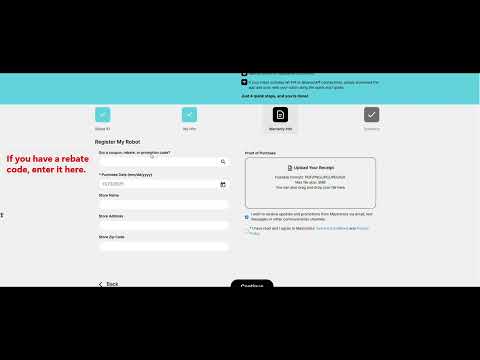
Step 5Add promotion and purchase details
Enter your rebate or promotion code in the first field, if you have one. Otherwise, leave that field empty. Select your purchase date. You can also provide the store name, address, and ZIP code.
-
Step 6Upload your proof of purchase
Select “Upload Your Receipt.” An original receipt or original invoice is preferred. It must include the purchase date, product, and price.
If you cannot find the original receipt, you can use a credit card or bank statement instead. Leave only the date, merchant/product, and amount visible. Hide or remove personal information before uploading it.
-
Step 7Accept the terms
Agree to the Terms & Conditions, then select “Continue.”
-
Step 8Review and submit
Check the information you entered, then select “Submit” to finish registering your Dolphin.
Check your warranty length
Warranty length depends on your model and region. Check your model's product page for its warranty length. Poolbots' pool experts can help by live chat or phone if you need clarification.
Watch the registration walkthrough
This video covers robot registration and rebate request submission.
Start a warranty repair claim
For a Dolphin repair or power supply replacement, use Maytronics' self-service tool to submit a warranty claim, also called an RMA (Return Merchandise Authorization).
If you need help, contact Poolbots' pool experts by live chat or phone. For warranty repairs, Poolbots will point you to Maytronics' service process.
Applicable models
- Dolphin Wave 120
- Dolphin Wave 100
- Dolphin Sigma
- Dolphin M400
- Dolphin Wave 60
- Dolphin Oasis Z5i
- Dolphin Wave 80
- Dolphin Nautilus CC Supreme
- Dolphin Explorer E40
- Dolphin ADVANTAGE
- Dolphin Nautilus CC
- Dolphin Proteus DX3
- Dolphin Echo
- Dolphin S100
- Dolphin Nautilus AG
- Dolphin Premium 10
- Dolphin T15
- Dolphin Cayman
- Dolphin Premium 20
- Dolphin T25
- Dolphin Active 10
- Dolphin S50
- Dolphin Active Solo
- Dolphin Active 15
- Dolphin Escape
- Dolphin ADVANTAGE ULTRA
- Dolphin S200
- Dolphin Quantum
- Dolphin Active 20
- Dolphin ADVANTAGE PRO
- Dolphin Proteus DX4
- Dolphin Nautilus CC Pro
- Dolphin Proteus DX5i
- Dolphin S300
- Dolphin Active 30
- Dolphin Premium 30
- Dolphin T35
- Dolphin Premium 40
- Dolphin T45
- Dolphin Explorer E30 WiFi
- Dolphin T55i
- Dolphin S400
- Dolphin Active 40
- Dolphin Explorer E50
- Dolphin Premier
- Dolphin Nautilus CC Plus
- Dolphin Explorer E25
- Dolphin Nautilus CC Plus WiFi
- Dolphin Nautilus Titan
- Dolphin M550
- Dolphin Premium 60
- Dolphin M600
- Dolphin T60
- Dolphin Explorer E70
- Dolphin W20
- Dolphin Wave 300 XL
- Dolphin Wave 140
- Dolphin Wave 200 XL
- Dolphin Liberty 200
- Dolphin Liberty 300
- Dolphin Liberty 400
More for the Wave 200 XL

