
























Support answer · Using Your Robot
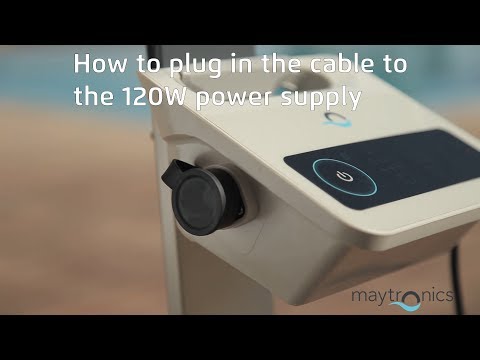
How do I plug the blue cable into the power supply?
Short answer: Open the black cable locker, align the plug with the power supply opening, then turn the blue cable's grooved ring to secure it.
Based on Maytronics support, updated 2025-06-22, rewritten by Poolbots' pool experts. Parts that fix it are below.
The answer
What to know.
-
Step 1: Open the cable locker Open the cover on the power supply's black cable locker.
-
Step 2: Align the plug Line up the notch on the black Amphenol plug with the matching notch in the power supply's plug opening.
-
Step 3: Secure the blue cable Turn the grooved ring on the blue cable until the cable is securely fastened.

Source: Maytronics support. Same steps and facts, rewritten for clarity; the videos and illustrations are Maytronics' own.
Replacement parts
Parts that fix this.
This answer comes down to power supplies & chargers and cables & swivels. The exact part depends on the model: choose your robot and we open its parts list, or browse the category for every model.
Browse by category:Power Supplies & ChargersCables & Swivels All genuine Dolphin parts →
Still need help?

