












- Free 1-3 Day FedEx Shipping
- 30-Day Trial, No Restocking Fees
- Low Price Guarantee
- Authorized Dealer


Wi-Fi lets you start, schedule and check on a pool robot from your phone. Here is which robots have it, what their apps really do, and what still takes a pair of hands.
The Quick Answer
Buy the Dolphin Sigma if you want the most complete connection: myDolphin Plus over Wi-Fi and Bluetooth, a weekly scheduler by day and time, filter alerts and Siri voice control. The Quantum gives you Wi-Fi start, stop, scheduling and modes for much less. Clear S is the app-control pick for joystick driving and live pool temperature.
See All 3 PicksSearch for the best robotic pool cleaner with WiFi and you will find the word 'smart' on almost everything. We go by what the spec sheet states. Of the seven robots in our guides, two Dolphins state Wi-Fi outright: the Sigma and the Quantum. The Clear S and Clear UV are controlled through the Clear app, and we will tell you what that app does without guessing at how it connects. The Premier, Cayman and Escape have no app at all; every control is on the power supply.
If you came looking for the best robotic pool cleaner with app control, the same three robots are your shortlist, and the ranking below explains which app does what. One thing up front: an app starts the robot. It does not put the robot in the pool, and it does not empty the filter.
Our Top Picks for WiFi and App Control
Ranked for this job, with today's price on each. We sell every robot on this list.
-
Top Pick
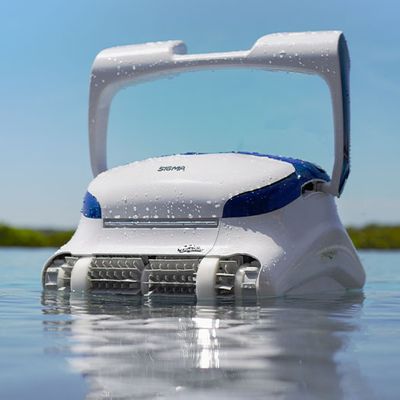

Best Overall: Wi-Fi, Bluetooth, Alerts and Siri
Dolphin Sigma
The Sigma has the fullest connection of the three. Its myDolphin Plus app works over Wi-Fi and Bluetooth, so you can reach it through your home network from anywhere and still connect at the poolside if the Wi-Fi does not stretch that far. The weekly scheduler sets cleanings by day and time, the app sends a filter alert when the cartridges need emptying, and Siri voice control is supported.
It is also the most robot: three commercial-grade ProLine motors moving 4,500 GPH, quad scrubbing brushes, SmartNav 3.0 with an onboard gyroscope, NanoFilters and standard cartridges in the box, and a 3-year warranty. You pay for all of it; this is the highest-priced pick here.
- Good Fit
- Buy this if you want scheduling to the hour, filter alerts on your phone and a Bluetooth fallback.
- Think Twice
- Skip this if you only want to start and stop from your phone. The Quantum does that for far less.
-
#2
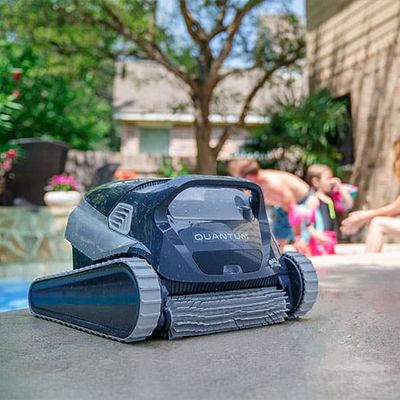
Best Value: Full Wi-Fi Control for the Least Money
Dolphin Quantum
The Quantum's myDolphin Plus app runs over Wi-Fi and covers what most owners use: start, stop, schedule, cleaning modes and alerts. We do not claim Bluetooth for it, so your home network has to reach the power supply. Its backup is different and just as useful: a weekly timer on the power supply, set to every day, every 2 days or every 3 days, that keeps running with no phone and no network.
The robot itself brings an XXL MaxBin basket with over 400 sq in of filter area, a dual HyperBrush, and published coverage of sun shelves, Baja ledges and stairs. It is the lowest-priced pick on this page, with a 2-year warranty.
- Good Fit
- Buy this if your Wi-Fi reaches the pool and you want app control without paying for the top model.
- Think Twice
- Skip this if your signal dies before the pool and you still want phone control; our top pick's Bluetooth covers that.
-
#3
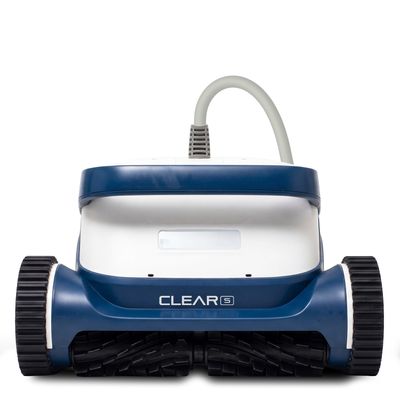
Best App Extras: Joystick Driving and Live Temperature
Clear S
Clear S is on this page for app control, and we will be exact about what we know. The Clear app runs on iOS and Android and gives you weekly schedules, six cleaning modes, manual joystick driving and live pool temperature. No other pick here lets you steer the robot from your phone or shows how warm the water is. What we do not publish is how the app connects, so if Wi-Fi specifically is your requirement, the two Dolphins above are the confirmed answers.
As a cleaner it is strong: 8,500+ GPH from two pump motors, front and rear active scrubbing brushes, 1-micron fine panels and a 3-year limited warranty.
- Good Fit
- Buy this if you want to steer the robot to a missed spot and see pool temperature in the same app.
- Think Twice
- Skip this if you need the connection type confirmed in writing before you buy, or ask our pool experts first.
What to Check Before You Pay for WiFi
-
What the App Actually Controls
Apps differ. One schedules by day and time and sends filter alerts; another adds cleaning modes; a third lets you steer. Read the feature list for the robot, not the word 'app' on the box, and decide which of those you would use every week.
-
Whether Your Signal Reaches the Power Supply
The power supply is the part that goes online, and it sits outside, set back from the pool. Your home Wi-Fi has to reach that spot. Stand there with your phone before you buy. If the signal is weak, plan on moving the router or adding an extender.
-
A Way In When the Connection Drops
Routers reboot and passwords change. A second way in, Bluetooth at the poolside or a timer on the power supply, keeps the pool on schedule while you sort out the network.
-
The Robot Underneath the App
Connectivity is the last ten percent. Motors, brushes, filtration and coverage decide how clean the pool gets; the app decides how convenient it is. All three picks are floor, wall and waterline robots for in-ground pools up to 50 ft.
The Three App-Controlled Robots Compared
Published specs for the picks above, with today's price.
| Specification | Dolphin Sigma | Dolphin Quantum | Clear S |
|---|---|---|---|
| Price Today | $2349 | $1599 | $1749 |
| Cleans | Floor, walls and waterline | Floor, walls, waterline, sun shelves and stairs | Floor, walls and waterline |
| Scheduling | Weekly scheduler by day and time | Weekly timer: every day, every 2 days or every 3 days | Weekly schedules in the Clear app |
| App | myDolphin Plus (Wi-Fi and Bluetooth) | myDolphin Plus (Wi-Fi) | Clear app (iOS and Android) |
| Filtration | NanoFilters and standard filter cartridges | XXL MaxBin basket with standard and NanoFilter panels | UltraFilter basket: 1-micron fine and 180-micron coarse panels |
| Brushes | Quad scrubbing brushes | Dual HyperBrush | Front and rear active brushes |
| Navigation | SmartNav 3.0 with gyroscope | SmartNav 2.0 | Gyroscope and accelerometer |
| Cable | 55 ft with 360° anti-tangle swivel | 55 ft with anti-tangle swivel | 59 ft anti-tangle |
| Warranty | 3 years | 2 years | 3 years (limited) |
| Shop | Shop the Sigma | Shop the Quantum | Shop the Clear S |
What Each App Does
The table lists only what the spec sheets state, which is why a few cells are blunt. Use it to match features to habits. If you would schedule once and never open the app again, any of the three will do and the Quantum is the value. If you want your phone to tell you the filter is full, that is the Sigma. If you like the idea of driving the robot to the corner it missed, that is Clear. The Clear UV has the same app as the Clear S and adds control of its built-in UV-C light, at a higher price.
| Feature | Dolphin Sigma | Dolphin Quantum | Clear S |
|---|---|---|---|
| App | myDolphin Plus | myDolphin Plus | Clear app for iOS and Android |
| Connection | Wi-Fi and Bluetooth | Wi-Fi | Not specified here |
| Scheduling | Weekly, by day and time | In the app, plus a weekly timer on the power supply | Weekly schedules |
| Other app features | Filter alert, Siri voice control | Start, stop, cleaning modes, alerts | Six modes, joystick driving, live pool temperature |
| If the Wi-Fi is down | Bluetooth at the poolside | Timer on the power supply | Ask us before you buy |
Check Your Signal Where the Power Supply Will Sit
The robot is underwater at the end of a cable. The part that talks to your network is the power supply, which lives outdoors, set back from the pool edge by the distance in the manual, ideally in shade. That spot is often the far side of the yard from your router. Before you order, stand there with your phone on Wi-Fi and load a web page. If it crawls, the robot's connection will too. A mesh point or an outdoor extender usually cures it. If nothing reaches, choose the Sigma for its Bluetooth, or the Quantum and lean on its timer.
What an App Will Not Do
It will not empty the filter. An app can tell you the filter is full; you still walk out, lift the robot and rinse it, at least weekly and more often in leaf season. It will not put the robot in the water or take it out before you shock the pool. It is not a handheld remote either: none of these robots includes one, and among the three only the Clear app offers manual steering. And an app adds nothing to cleaning power. If all you want is a pool that gets cleaned automatically, the Premier does that from a timer on its power supply with no app.
Getting a WiFi Robot Connected
- Test the signal at the power supply's spot before the robot arrives, not after.
- Have your network name and password in hand, and install the app before you unbox the robot.
- Set the schedule on day one. An app robot without a schedule is a robot you have to remember.
- Turn on filter alerts or notifications if the app offers them, and act on them the same day.
- On the Quantum, set the power-supply timer as well, so cleaning continues if the network does not.
WiFi and App Questions
Does the best robotic pool cleaner with WiFi work if my router is far from the pool?
Only if the signal reaches the power supply, which sits outdoors near the pool. Check with your phone at that spot. If it is weak, add an extender. If it cannot be fixed, the Sigma still connects over Bluetooth when you are poolside, and the Quantum still runs from the timer on its power supply.
Can I start a cleaning when I am not at home?
That is what Wi-Fi is for. With the Sigma or the Quantum online, you can start a cycle from wherever your phone has a connection, provided the robot is already in the pool. We do not specify how the Clear app connects, so ask us if away-from-home control is essential on a Clear.
Will the app tell me when the filter needs emptying?
On the Sigma, yes: a filter alert in the app is on its spec sheet. The Quantum's app lists alerts among its functions. For Clear S we have no filter alert to point to. On any of them, a weekly rinse is the habit that makes the alert unnecessary.
Can I steer a pool robot from my phone?
With Clear S or Clear UV, yes: the Clear app includes manual joystick driving. The two Dolphins here are controlled by starting, stopping, scheduling and choosing modes, not by steering. None of the robots on this page comes with a handheld remote.
Do I need WiFi for a robot to run automatically?
No. The Premier and the Cayman have timers on the power supply that need no phone, app or network, and the Quantum has one alongside its app. Wi-Fi adds control from a distance and scheduling by day and time. If automatic cleaning is the whole goal, a timer does it.
Still have questions? Browse our pool robot troubleshooting guides, contact our pool experts, or call (888) 615-5728

Which Connected Robot to Buy
Buy the connection you will use. For scheduling to the hour, filter alerts and a Bluetooth fallback, the Sigma is the complete package. For starting, stopping and scheduling over Wi-Fi at the lowest price here, the Quantum, with its timer as backup. For steering and a temperature readout, Clear S, once you are comfortable with what we can and cannot confirm about its connection. And if the honest answer is that you would set a timer and never open the app, buy a robot without one.

