




















- Free 1-3 Day FedEx Shipping
- 30-Day Trial, No Restocking Fees
- Low Price Guarantee
- Authorized Dealer


At this budget the Escape's optional Automation Timer comes within reach, and that upgrade turns a robot you start into a robot that starts itself.
The Quick Answer
Under $800, the pick is still the Dolphin Escape, and this budget covers the version with the optional Automation Timer power supply, which runs a cycle every 24, 48 or 72 hours. That timer is the upgrade worth paying for. It suits above-ground pools and in-ground pools up to 33 ft. In-ground owners who want a longer cable and a timer as standard should save for the Dolphin Cayman.
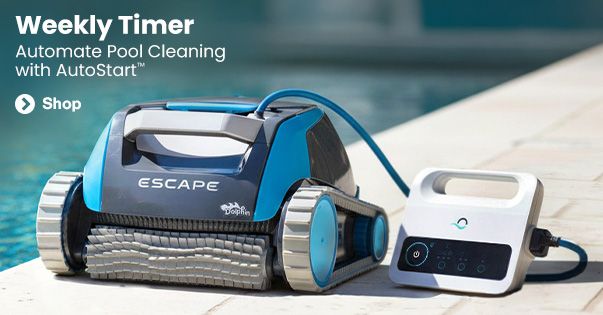
See Our PickThe best robotic pool cleaner under $800 is the same robot as our $700 answer. What changes is the power supply. The standard Escape waits for you to press start. The version this budget reaches comes with the Automation Timer, an optional power supply that starts a cycle every 24, 48 or 72 hours with no phone and no Wi-Fi.
That sounds like a small change, and it is the one that decides whether the pool stays clean in a busy month. A robot you have to remember gets used when the floor already looks bad. A robot on a schedule gets ahead of the dirt. This page covers how to set it, what it still will not do, and who should hold out for the next robot up.
Our Pick Under $800
Ranked for this job, with today's price on each. We sell every robot on this list.
-
Top Pick
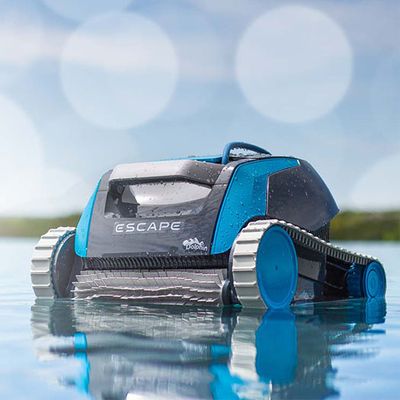

Escape With the Optional Automation Timer
Dolphin Escape
With the optional Automation Timer power supply, the Escape stops depending on your memory. Set it to 24, 48 or 72 hours and it runs its 1.5-hour floor-and-wall cycle on that interval, with nothing to pair and no signal needed. A short cycle is an advantage here: a run every second day keeps the floor ahead of the debris without the robot working all afternoon.
Between runs, the MaxBin basket, 50% larger than standard Dolphin filters, has room for more than one light cycle, so you empty it on your own schedule. It is the least you can spend here on a robot that cleans while you are at work.
- Good Fit
- Buy this if you have an above-ground pool, or an in-ground vinyl, gunite, fiberglass or tile pool up to 33 ft, and want it cleaned on a schedule.
- Think Twice
- Skip this if you want waterline cleaning or a cable over 40 ft. Owners of plaster and pebble in-ground pools should look at the Cayman first.

What Decides the Choice Under $800
-
The Timer Is the Upgrade
Cleaning power is identical with or without it. What changes is consistency. A scheduled robot runs on the days you are busy, away or simply not thinking about the pool, and frequent cycles pick debris up before it breaks down on the floor.
-
Three Intervals to Choose From
The Automation Timer runs a cycle every 24, 48 or 72 hours. That covers a pool under trees, a typical family pool, and a lightly used or screened pool. It is an interval, not a day-by-day calendar, so think in terms of how often, not which days.
-
Cable Reach When the Robot Stays In
A scheduled robot sits in the water between cycles, so the cable stays out too. The cable is 40 ft with no swivel. Check that it reaches from the power supply to the far wall with slack, and plan to untwist it when you empty the basket.
-
Your Pool Type and Surface
The Escape takes on above-ground and in-ground pools alike, up to 33 ft long. Its published surfaces are vinyl liner, gunite, fiberglass and tile. The Cayman's list adds concrete, plaster and pebble by name, so if your finish is one of those three, that is the robot whose published spec covers it.
-
What Is Still Missing
This budget still does not include waterline cleaning, an app or a swivel cable. The schedule changes when the robot cleans, not what it cleans: floor and walls, in a 1.5-hour cycle, every time it starts.
Choosing 24, 48 or 72 Hours
Pick the interval by how fast your pool gets dirty, not by how clean you would like it in theory. Running more often than the pool needs only adds wear and fills your week with basket emptying.
Start at 48 hours, look at the floor just before a cycle is due, and adjust. If it is already clean, move to 72. If debris has been sitting there for a day, move to 24. Check the manual for how the start time is set, and aim for hours when nobody is swimming.
- Every 24 hours. For pools under trees, pools open to wind and dust, and peak swimming weeks. Check the basket twice a week at this pace.
- Every 48 hours. A sensible default for a family pool in season. Enough to stay ahead of normal debris, with a weekly basket rinse.
- Every 72 hours. For screened enclosures, pools kept covered between swims, and the cooler months when little falls in.
Leaving a Scheduled Robot in the Pool
A robot on a schedule is made to stay in the water between its cycles. That is the point of the upgrade. It still needs a routine. Lift it out at least once a week to empty and rinse the filter, more often in leaf season, and use that moment to take the twists out of the cable, since there is no swivel to do it for you.
Before a shock treatment or any chemical dose, the robot comes out and stays out until the water is back to normal levels. If the pool is going to sit idle for weeks, do not leave the robot soaking: switch the schedule off and store it dry, out of direct sun.
One more habit: nobody should swim during a cycle. If a cycle comes round while people are in the pool, stop the robot at the power supply and let the next interval pick up the work.
Who Should Save a Little Longer for the Cayman
The Cayman lists above this budget, so this is a question of waiting, not of choosing today. Three kinds of owner should wait. The first has an in-ground pool finished in plaster, pebble or concrete, which the Cayman's published surface list names. The second has an outlet far enough away that 40 ft of cable is tight, because the Cayman has 50 ft. The third simply wants scheduling built in as standard.
There is a twist worth knowing. The Cayman's timer has one setting, every day. The Escape's optional timer gives you three intervals. If you want a clean every second or third day without thinking about it, the lower-priced robot is the more flexible one. Neither cleans the waterline.
Setting Up the Timer Version
- Confirm on the product page that you are choosing the Automation Timer option, not the standard power supply.
- Set the power supply where it is shaded and the required distance from the water, because it will now be plugged in all season.
- Run the first cycle by hand and watch it. Fix any cable snag or stuck spot before you hand the job to the schedule.
- Begin on the 48-hour setting and adjust after two weeks, once you have seen how much lands in the basket.
- Put a weekly reminder on your own calendar for the basket. The robot has no app to tell you it is full.
Under $800: Timer Questions Answered
Is the Automation Timer worth paying extra for?
For most owners, yes. The best robotic pool cleaner under $800 is the Escape with that optional timer, because scheduled cleaning is the feature people use every week. If you are home most days and like running the robot yourself, the standard version does the same cleaning for less.
Which setting should I use: 24, 48 or 72 hours?
Start at 48 hours. Move to 24 if debris is sitting on the floor before the next cycle, as it will under trees or in windy weeks. Move to 72 if the floor is still clean when the robot starts. Each cycle is the same 1.5 hours whichever interval you choose.
Can the robot stay in the pool between scheduled cycles?
Yes. With the Automation Timer that is how it is meant to be used. Lift it out at least weekly to empty and rinse the filter, take it out before shocking or adding chemicals, and store it dry and shaded if the pool will go unused for a long stretch.
Should I save for the Cayman instead of buying at this budget?
If your pool is in-ground with a plaster, pebble or concrete finish, or you need more than 40 ft of cable, yes. The Cayman has a 50 ft cable, a 2-hour cycle and a timer as standard. If your pool is above-ground, or you want an interval longer than daily, buy the Escape with the optional timer now.
Does the Automation Timer need Wi-Fi or a phone to work?
No. The Automation Timer is part of the power supply and is set there. There is no app for this robot and nothing to connect. Once the interval is chosen, the robot keeps to it until you change the setting.
Still have questions? Browse our pool robot troubleshooting guides, contact our pool experts, or call (888) 615-5728

Pay for the Timer, Then Stop Thinking About It
Under $800, buy the Escape and take the optional Automation Timer. It is the same floor-and-wall robot as the standard version, and the schedule is what keeps a pool clean when life gets busy. Choose it for above-ground pools and for in-ground pools up to 33 ft on its published surfaces. Hold out for the Cayman if you have plaster or pebble, or a long cable run. Poolbots backs the price on the card with a low price guarantee.

